Skip to content
Market context, made clearer

See your setup clearly.

Bring market context, key levels, and the reasons behind a setup together in one view. Explore the evidence. Make your own call.

Early Access applications are reviewed individually, and selection is not guaranteed.

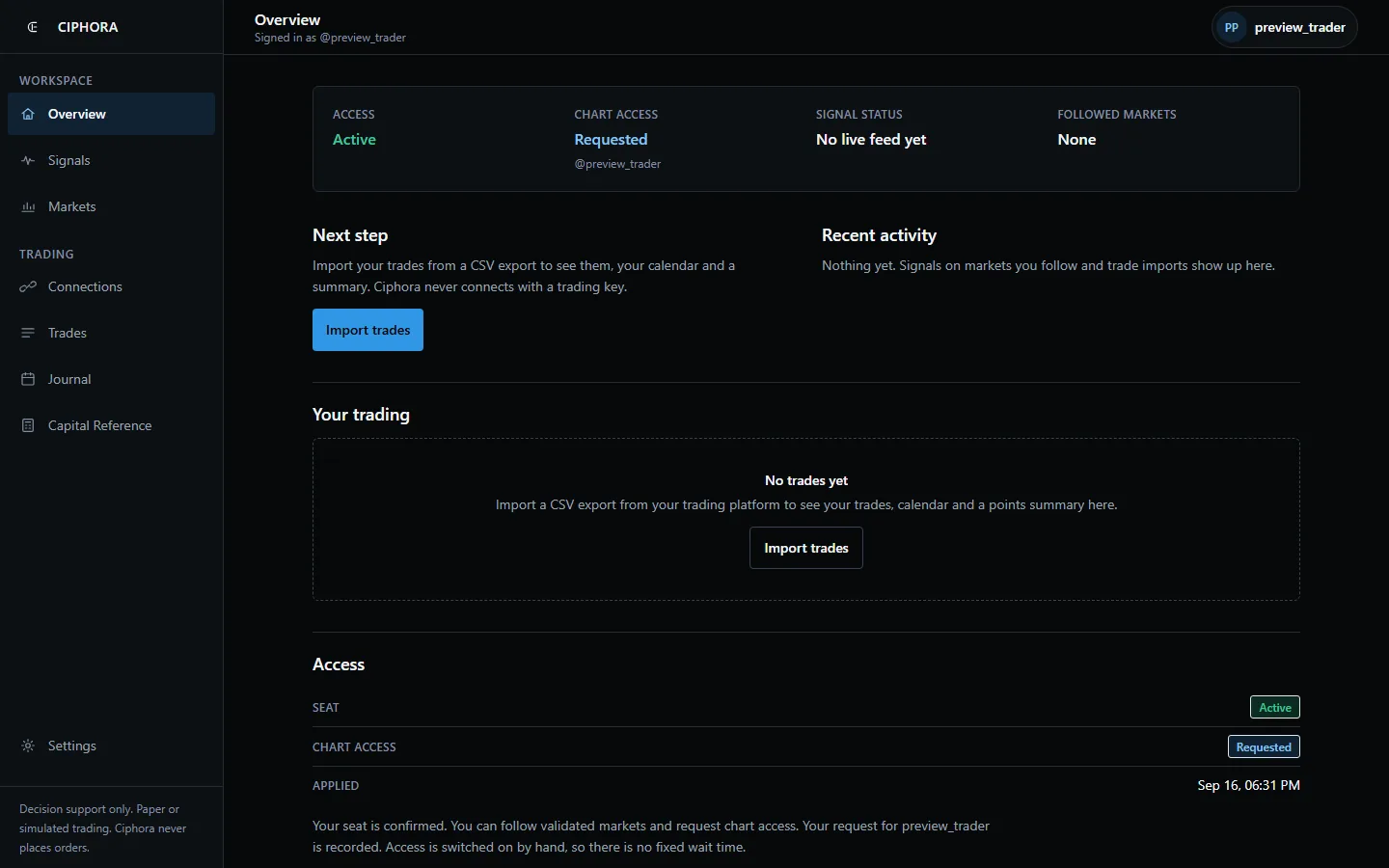
The Ciphora workspace on a laptop: a left rail with Overview, Signals, Markets, Connections, Trades, Journal, Capital Reference and Settings; a status strip reading Access active, Chart access requested, Signal status no live feed yet, Followed markets none; a next step to import trades from a CSV export; recent activity reading nothing yet; and an empty trading summary
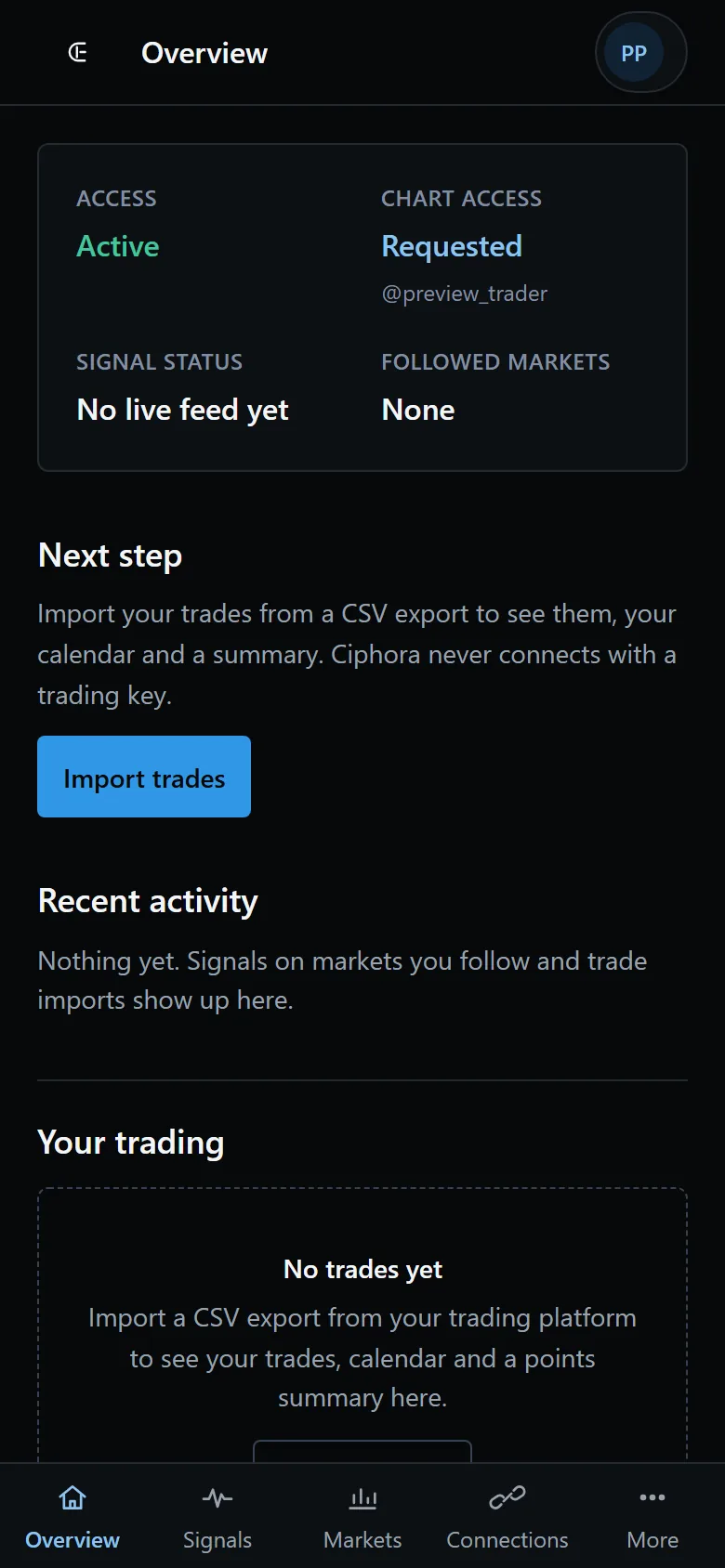
The Ciphora workspace on a phone: the same status strip stacked in two columns, the next step, recent activity and a bottom app bar with Overview, Signals, Markets, Connections and More

Static cross-device product view shown.

Captured from the reviewed Ciphora workspace with a seeded test account and no personal data. The 3D devices are original Ciphora geometry and carry no hardware trademark.

Data paths available today

Names identify platforms you choose to import from. They do not indicate a partnership, an integration agreement, or an endorsement.

  • TradingViewAlert delivery and Pine log importPine log imports are labelled simulated. Not account history.
  • TopstepX / ProjectXCSV fill importNo read-only connection. Full trading API keys are never accepted.
  • RithmicCSV fill importAutomatic sync blocked. No credentials are collected.
  • TradovateCSV fill importRead-only sync is built but switched off until provider credentials are verified.

Walkthrough

From your trade export to your next plan.

Four short scenes from the beta workspace. Choose one, or let the tour play while it is on screen.

In the beta workspace. Illustrative data.

Bring in your fills from a CSV export.

  1. Add an import source for the platform you trade on.
  2. Choose the CSV export and check it. Nothing is saved yet.
  3. Import the readable fills, and Ciphora builds your trades from them.

Automatic sync is not available yet. Every provider works through a CSV export today.

Ciphora workspace
Illustrative data

Connections

Imports only. No provider is syncing automatically.

Evaluation account

TopstepX / ProjectX

Import only

Trade export (CSV)

Choose filefills-export-sep-8-10.csv
Check fileImport 11 new fills

15 rows · 13 readable · 2 rejected · 2 already imported

Rejected: row 7: duplicate id within file; row 11: unreadable time

Trades built from your fills

  • Sep 8, 09:42 AMLong26.50
  • Sep 8, 10:31 AMShort-8.75
  • Sep 9, 09:51 AMShort25.75

In the beta workspace. Illustrative data.

See every trade your fills produced.

  1. Fills are matched in time order into trades, measured in points.
  2. Net points count closed trades only. An open position stays open.
  3. Fees appear exactly as your export reported them.

Counts and points from fills you imported. Not currency, not a return, not a performance claim.

Ciphora workspace
Illustrative data

Your trading

6 trades from your imports, from the Overview and Trades pages

Trades

6

5 closed, 1 open

Net points (closed)

+30.25 pts

Trading days

3

Fees (as exported)

5.92

OpenedClosedMarketSideQtyEntryExitPointsFees
Sep 8, 09:42 AMSep 8, 09:58 AMMNQZ6Long223961.2523974.5026.501.48
Sep 8, 10:31 AMSep 8, 10:44 AMMNQZ6Short123988.0023996.75-8.750.74
Sep 9, 09:51 AMSep 9, 10:12 AMMNQZ6Short224012.5023999.6325.751.48
Sep 9, 11:20 AMSep 9, 11:26 AMMNQZ6Long124020.0024010.25-9.750.74
Sep 10, 09:47 AMSep 10, 10:05 AMMNQZ6Long123944.5023941.00-3.500.74
Sep 10, 10:39 AMOpenMNQZ6Short223960.13n/aopen0.74

Points per contract with fees as your export reported them. Nothing here is a return, a balance, or a performance claim.

In the beta workspace. Illustrative data.

Write down what you saw while it is fresh.

  1. Pick the day and link the note to one of your imported trades.
  2. Add a title, your notes and a few tags.
  3. The calendar shows the note beside that day's points.

Days show net points from closed trades and your note count. Points, not money.

Ciphora workspace
Illustrative data

Journal

September 2026: 3 trading days, 1 note

Illustrative trading days and notes for one week of September 2026
MonTueWedThuFri
78+17.89+16.01 note10-3.511

New note

Date
2026-09-09
Link to a trade (optional)
MNQZ6 short Sep 9
Title (optional)
Waited for the retest
Save entryTags: review, patience

Notes in September 2026

Waited for the retest 2026-09-09

Stayed out of the open. Sold the second rejection at the session high and covered in two parts. Keep the same patience tomorrow.

#review #patience

In the beta workspace. Illustrative data.

Size the trade from your own risk limit.

  1. Choose the market and type the amount you are working from.
  2. Change the risk percent or the stop, and the size updates as you type.
  3. The timeframe is saved as context. It never changes the size.

Arithmetic from published contract values, not advice.

Ciphora workspace
Illustrative data

Capital Reference

Contract size from your capital, risk percent and stop distance

Market
MNQMicro E-mini Nasdaq-100
Capital source
Manual reference amountAn amount you type. It is a reference for the arithmetic, not a balance.
Reference amount (USD)
$25,000
Risk per trade (%)
0.8= $200.00
Stop (MNQ points)
15= 60 ticks

Preview, not saved yet

Maximum size

6contracts of MNQ

Risk budget
$200.00
Risk per contract
$30.00
Risk used
$180.00
Risk unused
$20.00

Timeframe (context only): 5 minutes

Stored with the calculation for the historical view. It never changes position size.

Historical context: not available. Ciphora's current historical data entitlement does not cover these CME futures, so no chart or sample series is shown.

One chartEight kinds of market context
Private research betaFree and invitation only
See what agreesConfidence is not win probability
You stay in controlNo trade execution or account management

The workspace

What a participant sees today

One quiet workspace: your access, the markets you follow, the signals they produce, your connections and trades. Markets open only after research proves them, and until then the page says so instead of showing a placeholder.

The Ciphora workspace on a laptop: a left rail with Overview, Signals, Markets, Connections, Trades, Journal, Capital Reference and Settings; a status strip reading Access active, Chart access requested, Signal status no live feed yet, Followed markets none; a next step to import trades from a CSV export; recent activity reading nothing yet; and an empty trading summary
The Ciphora workspace on a phone: the same status strip stacked in two columns, the next step, recent activity and a bottom app bar with Overview, Signals, Markets, Connections and More
Captured from the reviewed build in a seeded test account with no personal data. No market is available to follow in this capture, so the feed is empty; no account figures, trades or decisions are shown.

Across the workspace

The product stays connected from review to research.

These product views use one illustrative, non-personal dataset and clearly mark the capabilities that remain gated or planned.

Review performance and the decisions behind it.

Imported fills become a points summary, calendar and journal. The same test dataset stays consistent across both views.

September 8-10

Net points

+30.3

Positive sessions
62.5%
Closed trades
8
Tue
Wed
Thu

Recent trades

  • MNQZ6 short+25.75
  • MNQZ6 long-9.75
  • MNQZ6 long-3.50

Illustrative imported-fill data. Points, not money or a return.

Linked to MNQZ6 short · Sep 9

Waited for the retest

Stayed out of the open. Sold the second rejection at the session high and covered in two parts.

Outcome
+25.75 pts
Review
Followed plan

review · patience · session high

Ciphora workspace
Illustrative data

Strategy Lab

Ideas, versions and validation status

Instrument

MNQ · 5m

Risk

0.50%

Lifecycle

Ready to test

Strategy rules

entry: close > session_high and retest_confirmed

exit: stop 8 ticks · target 16 ticks

costs: 1 tick slippage · fees included

Historical execution is gated. No mock results are substituted.
Validation
Walk-forward
Holdout share
30%
Progress
Blocked by data access
Result
Not available

Turn a hypothesis into a governed test.

Version the rules, choose validation settings and keep the run blocked when historical coverage is unavailable.

The Python workspace remains a planned interface. The current product stores structured strategy rules and reproducible test requests.

Keep limits, evidence and explanations together.

Risk controls govern paper-strategy eligibility. The assistant explains documented states and cites the Ciphora material it used.

Ciphora workspace
Illustrative data

Risk

Controls shared by paper strategies and automation checks

Workspace trading state

Available

The emergency pause blocks paper automation eligibility.

Risk per trade
0.50%
Maximum drawdown
10.0%
Daily loss limit
500 USD
Open positions
3 max
  • Ready
    Current strategy version
  • Pending
    Validated market data
  • Ready
    Position and drawdown limits

Assistant

Sources on

Why is this backtest blocked?

Ciphora has the strategy definition, but the current historical-data entitlement does not cover this futures request. The run stays blocked and no sample result is substituted.

From: Backtests · Data availability

Related research

MNQ opening-range hypothesis

3 saved notes · 2 source links

Ask about Ciphora

Illustrative conversation using reviewed product documentation.

Research workflow

Evidence becomes a testable strategy, one recorded step at a time.

This illustrative playthrough uses the same Ciphora surfaces as the signed-in workspace. It shows the workflow and its safeguards, including an honest stop when historical data access is not verified.

Ciphora workspace
Illustrative data

Research Intelligence

1. Save evidence and connect a hypothesis

Opening rangeNQ observationVolatility regimeRisk noteHypothesis

Opening range continuation

Linked to one observation, one regime and one risk finding.

Hypothesis
Ciphora workspace
Illustrative data

Strategy Lab

2. Turn the hypothesis into an inspectable draft

Instrument
NQ · 5m
Direction
Long and short
Risk per trade
0.50%
Version
v1

Lifecycle

Idea → Draft → Backtest → Validate → Paper

Ciphora workspace
Illustrative data

Backtests

3. Request a reproducible validation run

Opening range continuation · v1

Walk-forward · 30% held out · costs included

Blocked
Historical execution waits until Databento entitlement and instrument coverage are verified. No substitute results are shown.
Ciphora workspace
Illustrative data

Automations

4. Dry-run the workflow before enabling it

  1. Interval triggerMatched
  2. Data freshness conditionEvaluated
  3. Walk-forward actionWould run

Dry run only. No order, strategy status or live account is changed.

Less switching. More context.

Keep the questions that matter together: what supports the idea, what conflicts, and where it stops making sense.

Bring the chart together

See trend, volatility, session, structure, and liquidity in one reading.

See behind the score

Read the conditions behind the score, including the ones that disagree.

Keep your own perspective

Use the context alongside your own plan and risk rules.

From chart to your own decision.

Three steps to explore a reading.

  1. Observe the context

    Start with the market conditions shown on your chart.

  2. Evaluate the case

    Check what agrees, what conflicts, and the levels behind the idea.

  3. Decide independently

    Use your own plan, position sizing, and risk rules. You control execution.

Inside the engine

See the context before you act.

Market conditions, agreement, and key levels in a familiar view.

Understand conditions

Read trend, volatility, regime, and session context together instead of in separate windows.

Inspect agreement

See which factors support the current reading and which ones conflict with it.

Frame the decision

Keep risk and invalidation context visible beside the setup rather than adding it afterward.

Review consistently

Use the same decision framework from chart to chart and observation to observation.

Explore Ciphora Confluence Engine

Explore the research behind Ciphora.

See what has been studied, what is still being tested, and the limits of the current evidence.

View the study details
Build identifier
CONFL-V1.2-RP-20260716
Model version
RM-2.0
Records
383 unique records
Coverage
13 symbol series across 12 logical markets
Timestamps
246 timestamps
Review period
Apr 29 to Jul 17, 2026

Before you use it

What this evidence does not establish

No headline performance statistic is approved. The current evidence does not establish calibrated probability, and it is not validated performance.

Review the current research scope

Documentation

Make yourself at home.

Learn the chart, understand the labels, and find your setup guide.

Browse by area

Platform

Get to know the chart and the labels you see.

Research

How Ciphora researches, validates, and publishes.

Open the documentation portal

Help Center

Find answers about getting started, beta access, and using the product.

Getting Started

What Ciphora is, how the product works, and where to begin.

Ciphora Confluence Engine

How the engine's readings, confidence, and research tools work.

Early Access

How the application, review, and beta program operate.

Troubleshooting

Find help with product setup, beta access, or the website.

Risk and Education

Risk, limitations, and the role of decision support.

Visit the Help Center

Answers before you apply.

Does Ciphora give trade signals?

No. Ciphora Confluence Engine is decision support software. It organizes eight market context families into one reading, shows which factors agree and which ones conflict, and displays referenced entry, invalidation, and target levels with a rationale for each. It does not make the trading decision for you, and it does not establish a profitable edge.

What does Confidence mean?

Confidence measures how strongly current market conditions align with the engine's research-defined criteria. It is not a guaranteed outcome or win probability.

Does it repaint?

Signal timing and repaint behavior are unverified. Until verification completes, nonrepainting is not presented as a proven fact.

Is this financial or investment advice?

No. Ciphora provides software and research tools. You remain responsible for every decision, including whether to trade, how much to risk, and how to size a position.

Which markets and timeframes are in the research inventory?

The current research scope lists historical records for specific instruments on five-minute charts. This does not establish supported instruments or timeframes. Treat anything outside the listed inventory as untested.

Review the current research scope
What happens after I apply?

Applications are reviewed for fit with the current research cohort. Selected applicants receive an invitation and onboarding instructions. Selection is not guaranteed.

Get to know Ciphora first-hand.

Apply for the free, invitation-only research beta. Explore it in paper or simulated trading and share your feedback. Selection is not guaranteed.

The Ciphora workspace on a laptop: a left rail with Overview, Signals, Markets, Connections, Trades, Journal, Capital Reference and Settings; a status strip reading Access active, Chart access requested, Signal status no live feed yet, Followed markets none; a next step to import trades from a CSV export; recent activity reading nothing yet; and an empty trading summary
The Ciphora workspace on a phone: the same status strip stacked in two columns, the next step, recent activity and a bottom app bar with Overview, Signals, Markets, Connections and More
The same governed workspace moves from a full review surface to a focused mobile check without changing the underlying account state.

Ciphora provides decision support software, not financial or investment advice. Trading futures, forex, and other leveraged markets involves substantial risk. You remain responsible for every decision. Historical, hypothetical, simulated, or beta results do not guarantee future results.